Business Wire
Log In Sign Up
  • News
    • All News
    • News by Industry
    • News by Subject
    • News with Multimedia
    • News by Language
    • Tradeshows & Events
  • Services
    • Public Relations
      • Press Release Distribution
      • Interactive Media
      • Multimedia Distribution
      • Smart News Release
      • GMSM
    • Investor Relations
      • Press Release Disclosure
      • IPO Services
      • Filing Services
      • Canada Disclosure
      • IR Websites
      • Workiva
      • Corporate Social Responsibility
      • European Disclosure
    • Distribution & Analytics
      • Distribution Lists
      • Geographic Targeting
      • Industry Targeting
      • Demographic Targeting
      • Public Policy Services
      • NewsTrak Reports
    • Media & Journalist Tools
  • Resources
    • Blog
    • Whitepapers & Webinars
    • Distribution Lists
    • Customer Testimonials
    • Sample Press Release
    • Find Your News Online
  • Contact Us
    • General Inquiries
    • Office Locations
    • Media & Partnerships
    • Sign Up for an Account
    File with Workiva

    File with Workiva

    Simple instructions for submitting your print-ready press release to Business Wire from Workiva

    When issuing a press release, you can utilize Business Wire’s system integration with the Workiva platform to seamlessly distribute your news.

    To prepare a Business Wire press release submission, you will require a final document in the Workiva platform and your Business Wire credentials.

    Send your Workiva document to Business Wire in Five Easy Steps

    1. While in your document, click Save As on the File Tab, then select Press Release.
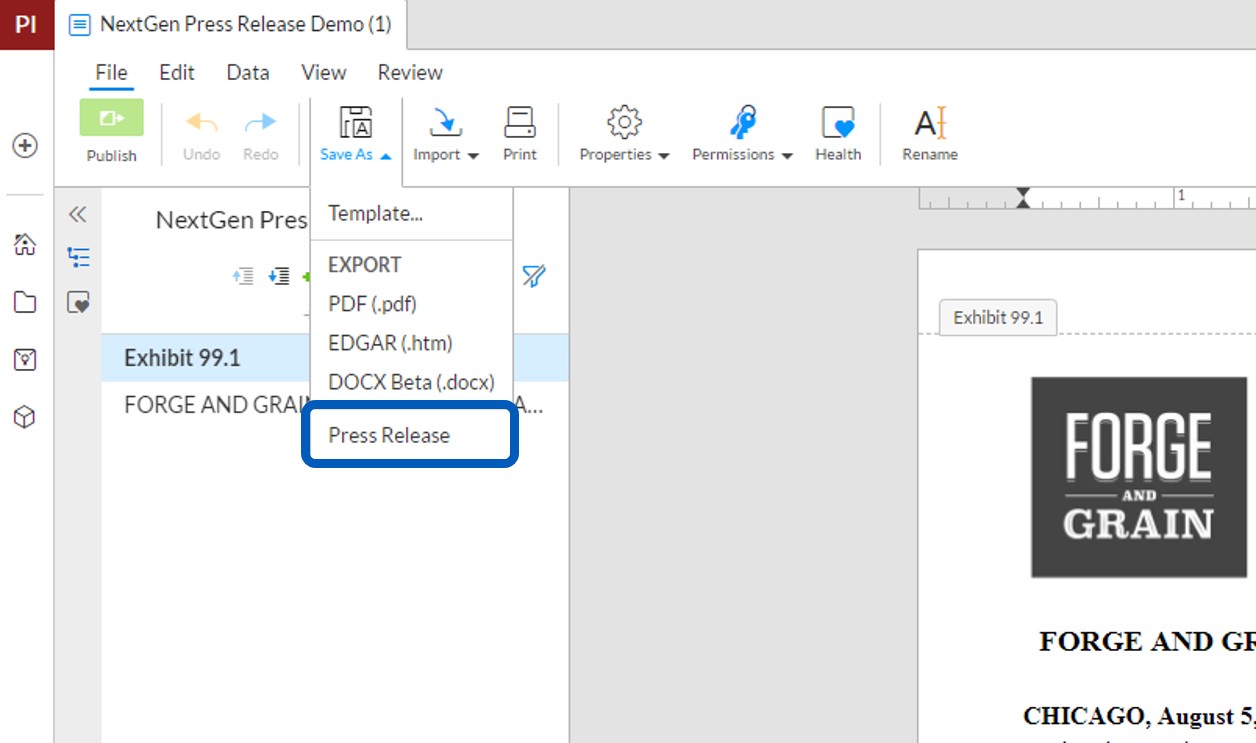
    Wdesk for website 4.5.21

    2. Enter your account username, password, contact email and phone number. Click Retrieve Accounts and select your account from the dropdown menu. If you would like to include any special instructions with your press release submission, please check the Include Special Instructions option and enter your specific request(s).
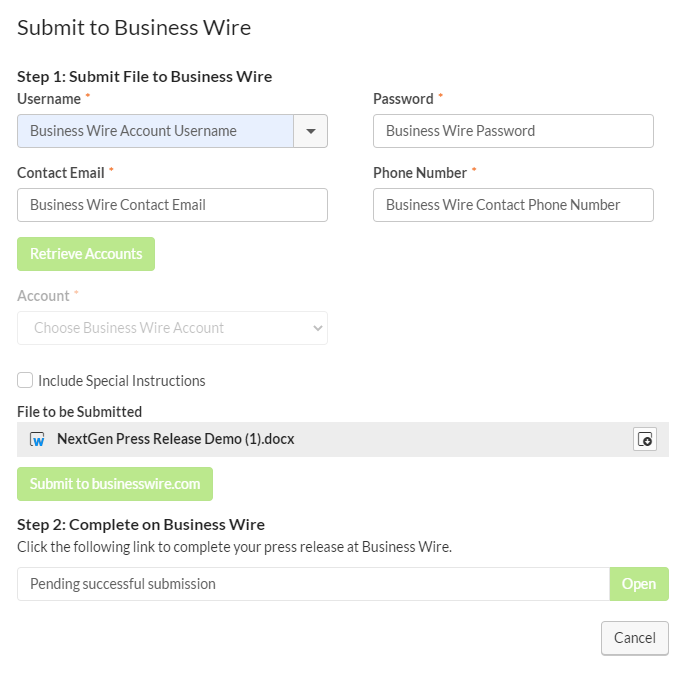
    WdeskStep2

    3. Review the files you will be including with this submission. You can download a preview of these documents by clicking the Download button to the right of the file name.

    4. Submit your press release and associated files to Business Wire by clicking the Submit to businesswire.com button.

    5. When the link appears, click "Open" to complete the submission process at Business Wire.

    If you do not currently have access to the PressTab feature in the Workiva platform, please reach out to your Business Wire account manager for additional details.

    Contact Business Wire

    Contact Us Today

    Speak with a Business Wire representative for product, service, and pricing information. Set up an account and share your news.

    Get Started
    News
    • News by Industry
    • News by Subject
    • News by Language
    • News with Multimedia
    Services
    • Public Relations
    • Investor Relations
    • Distribution & Analytics
    • Media & Journalist Tools
    Resources
    • Blog
    • Guides, Webinars, and More
    • Sample Press Releases
    • Customer Testimonials
    • Find Your News Online
    • Distribution Lists
    • Contact Us
    • Log In
    • Sign Up
    • Request A Demo
    • English
    • Deutsch
    • Español
    • Français
    • Italiano
    • 简体中文
    • 繁體中文
    • 日本語
    Business Wire

    Business Wire’s experience, one-on-one guidance, and superior media targeting help you reach your audiences and generate results.

    • About Us
    • Careers
    • Privacy Policy
    • Terms of Use

    © Business Wire, Inc.

    Business Wire on LinkedIn Business Wire on X Business Wire on YouTube Business Wire on Facebook Business Wire on Instagram